Physical Address
304 North Cardinal St.
Dorchester Center, MA 02124
Physical Address
304 North Cardinal St.
Dorchester Center, MA 02124

Explaining why Linux made the switch from initrd to the newer initramfs
While fixing some boot-related issues on my system, one thing caught my eye: Linux still uses the legacy initrd name as a pointer to initramfs, a modern initial filesystem, introduced in 2005. In this post, I’ll try to compare both these systems and explain why Linux still kept the pointer while changing the underlying temporary filesystem.
An init filesystem is a temporary filesystem that is used by the Linux kernel during the boot process to load the essential kernel modules/drivers and scripts required to mount the actual root filesystem and start the system.
The bootloader loads both the kernel (vmlinuz) and the initial filesystem into the RAM (located at /boot) and then passes a pointer to the kernel to point to the initial filesystem. The kernel then uncompresses itself (vmlinuz) and uses this temp filesystem as its root filesystem until the real root filesystem is mounted. This temporary filesystem is discarded once the real root filesystem is mounted and control is transferred to the normal system startup process.
Firmware > Bootloader > Kernel > Init FS > Real Root FS
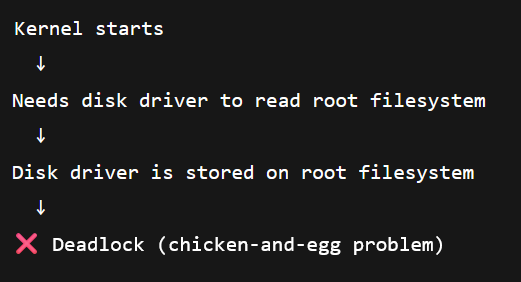
A question can arise: Why is it even required? And this is the core paradox or the “Chicken and egg problem”. To continue the boot process, the root filesystem needs to be mounted. To mount the root filesystem, the kernel needs access to the disks, and to read the disk, disk drivers are required, which are stored on the disk the kernel is trying to access.
The kernel is not supplied with everything already baked into it directly. Doing so would make the code difficult to maintain and the boot process slower. And because there can be different types of hardware, providing support for each type of hardware is practically not possible. Therefore, a separate initial root filesystem is provided with all the required ingredients.
Talking about the ingredients, the initial filesystem packs everything that the kernel requires in a single source, speeding the boot process. The following are the resources that such an initial filesystem supplies:
Once the kernel gains control, it executes the first userspace program from the initial filesystem. This early userspace environment loads the required kernel modules, initializes access to storage devices, and locates the real root filesystem. After the real root filesystem is successfully mounted, the system switches from the initial filesystem to the actual root filesystem. At this point, the temporary initial filesystem is discarded, and the normal system startup continues from the real root filesystem.
# Early userspace (initrd/initramfs)
mount -t proc proc /proc
modprobe sd_mod
modprobe ext4
mount /dev/sda1 /newroot
switch_root /newroot /sbin/init
This is a simplified representation of what early userspace does during boot.
Enough talking about the initial filesystem, and providing a high-level working, now let’s dig a little deeper and understand how these two work differently, and make a comparison.
| Aspect | initrd (Initial RAM Disk) | initramfs (Initial RAM Filesystem) |
|---|---|---|
| Era | Linux 2.2 / 2.4 (legacy) | Linux 2.6+ (current) |
| Purpose | Temporary root filesystem during early boot | Same purpose, redesigned |
| On-disk format | Compressed block device image | Compressed cpio archive |
| Internal FS | ext2 (usually) | None (extracted into tmpfs) |
Creates a RAM disk and mounts it as / | Creates RAM disk and mounts it as / | Unpacks directly into RAM |
| Requires mount | Yes | No |
| Root FS type | ramdisk block device | tmpfs |
| Size | Fixed at creation time | Dynamic (grows as needed) |
| Boot script | /linuxrc | /init |
| Root switch method | pivot_root | switch_root |
| Device handling | Static /dev nodes | Dynamic (usually udev) |
| Module loading | insmod (often manual) | modprobe |
| Userspace tools | Very minimal | More flexible |
| Error handling | Limited | Much better |
| Kernel support status | Obsolete | Actively supported |
| Still used today | No (emulated only) | Yes (standard) |
The initrd was replaced with initramfs to simplify, yet harden the early boot process. To change the root from the temporary system to the real root system, initrd uses pivot_root which is fragile, also the initrd needed to be mounted as a block-device image of a fixed size, which made resizing difficult, and there were tons of unnecessary complexities associated with the initrd. The initramfs on the other hand removed all this overhead by using a simple cpio archive that the kernel unpacks directly into memory, eliminating the need for a separate filesystem, loop devices, or size limits. It also allowed a richer userspace logic for handling modern requirements such as diverse storage hardware, dynamic device discovery, encryption, RAID, and LVM.
TL;DR: The pointer was kept to maintain backward compatibility with legacy boot protocols.
When a bootloader loads the kernel, it passes two things to it (among other things)
This points to “some blog in the RAM that should be used as early userspace”.
Historically, that ‘blob’ was initrd. Interestingly, even today, the kernel boot protocol has field names like:
initrd_startinitrd_end“Did you know?” Even today, the kernel boot protocol still refers to the initramfs memory region using legacy initrd pointers for ABI compatibility.
The reason that initrd name was not changed to initramfs is that:
/boot/initrd.img and /boot/initramfs-x.x.x.img are pure conventions; the kernel does not care about their names.And this is the reason why distros can still call it initrd.img even though it’s initramfs inside.
In conclusion, the evolution from initrd to initramfs reflects Linux’s broader design philosophy of solving real technical limitations without breaking existing systems. Even though initrd provided a good solution to the early boot process by supplying a temporary root filesystem and essential kernel modules, its block-device design and fixed size made it increasingly fragile, which was resolved by initramfs through a simpler, memory-native approach that removed unnecessary layers while preserving full backward compatibility through the existing boot ABI.
If you found this explanation helpful, feel free to share it with others exploring Linux internals, and leave a comment below with your thoughts, questions, or experiences working with early boot systems.